





Mobile Device Management (MDM) makes it possible to manage and secure mobile equipment, but by 2026 it will no longer be sufficient to meet the challenges of the Digital Workplace. This solution is showing its limits when it comes to device management and detecting advanced threats. To address increasingly demanding security and control requirements, companies are now turning to more comprehensive platforms.
Unified Endpoint Management (UEM) offers a broader approach, covering the entire IT environment as well as providing built‑in cyberthreat protection features. Technology is constantly evolving, and only human expertise in this field will enable organizations to anticipate emerging threats and align the best technological solutions with their strategies.
What Is MDM?
Mobile Device Management (MDM) is a tool that enables organizations to remotely manage and secure mobile devices such as smartphones and tablets. This management solution makes it possible to:
- Configure device settings (Wi‑Fi, Bluetooth, etc.).
- Control functionalities such as enabling or disabling the camera, microphone, data sharing, and more.
- Manage applications, including installation, updates, removal, and access restrictions.
- Monitor the technical lifecycle of devices (inventory, usage history, renewal planning…).
- Ensure functional security measures such as data encryption, remote locking, geolocation, and secure wiping in case of loss or theft.
MDM tools have historically supported mainly Android and iOS environments.
The Evolution of MDM
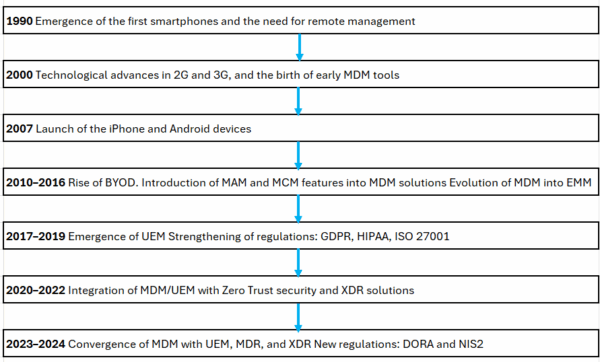
In 1994, the first smartphones began to appear. By the late 1990s, they gained popularity in professional settings thanks to the rise of personal digital assistants like the PalmPilot, which offered email and calendar features. These innovations led companies to recognize the need to manage mobile devices remotely.
Mobile Device Management (MDM) has undergone major changes since the early 2000s. Originally designed to secure and administer early business smartphones like BlackBerry, it gradually incorporated more advanced features to address the challenges of BYOD (Bring Your Own Device) and mobile application management in the 2010s.
As hybrid environments became more common, MDM evolved into Enterprise Mobility Management (EMM), and later into Unified Endpoint Management (UEM)—a more comprehensive approach that enables organizations to manage all types of endpoints, including mobile devices, desktops, and IoT systems.
Is MDM Alone Still Enough Today?
By 2026, MDM alone will no longer be sufficient. It has several limitations that prevent it from managing the full range of devices and use cases associated with the Digital Workplace. Mobile Device Management (MDM) only supports mobile devices such as smartphones and tablets. This excludes computers, IoT devices, and other equipment commonly used in business environments.
It also offers limited control over installed applications. For instance, it does not allow monitoring how professional apps are used on devices. Finally, its security features remain fairly basic —such as remote locking or wiping— without providing more advanced protections like strong authentication.
Developments in Endpoint Security in 2026
EMM
Enterprise Mobility Management (EMM) is a solution that brings together several components:
- MDM (Mobile Device Management) The features of MDM were described in the previous section.
- MAM (Mobile Application Management) Enables control over the installation, configuration, and use of professional mobile applications. This technology is particularly used in BYOD environments.
- MCM (Mobile Content Management) Secures the sharing and storage of corporate documents on mobile devices, with encryption capabilities and usage rights management.
- IAM (Identity and Access Management) Manages identities and access rights to corporate resources: multi-factor authentication (MFA), Single Sign-On (SSO), and role-based access control to ensure that only authorized users can access sensitive data. Devices enroll automatically and immediately receive security and access policies, reducing the workload for IT teams.
Modern EMM solutions also integrate tools such as VPN tunnels to secure access to the company’s internal data.
UEM
Unified Endpoint Management (UEM) includes all EMM features, while also adding IoT management and more advanced administration of Windows, Mac, Linux, and other environments. One of the most important functions of UEM is securing the endpoints it manages. How does UEM protect devices and their data?
As mentioned earlier, UEM secures access to information through tunneling tools or secure drives. It also makes it possible to containerize business applications on the device, encrypting the associated data. However, while UEM ensures the functional security of endpoints, it is not designed to detect malicious behaviors such as phishing, smishing, malware, or zero‑day attacks, nor to secure the network traffic passing through these devices.
To address this gap, major UEM solutions are paired with Mobile Threat Defense (MTD) tools. Some UEM platforms can even integrate MTD features directly into their interface. MTD helps secure web browsing (blocking fraudulent websites and certain categories of content), protect devices with antivirus capabilities, filter malicious ads, and monitor data exchanges.
Human Expertise: A Value That Tools Alone Cannot Provide
Endpoint management solutions simplify device administration, equipment management, and data protection. But only human expertise can ensure effective security tailored to business needs. Experts configure security policies according to different profiles and use cases:
- VPN access and geolocation for sales teams on the move
- Secure containers for BYOD employees
- Privileged access to critical applications for IT staff
When an alert is triggered (whether it’s a fraudulent website or the installation of an unauthorized application) experts are able to analyze it and recommend additional protection measures to the client. Based on their assessment, they may decide to block access, isolate the device, or, if the alert poses no risk, dismiss it. Beyond day‑to‑day operations, experts support teams in their strategic decisions:
- Selecting endpoint management tools (EMM, UEM with MTD, etc.)
- Ensuring proper integration of EMM and UEM solutions
- Deploying by department, site, or device type
- Monitoring regulatory requirements (GDPR, NIS2, ISO 27001)
- Adapting security policies to evolving threats and usage patterns
For example, they may recommend migrating to a UEM solution suited to a multi‑OS environment or adding an MTD module to detect zero‑day attacks on Android.
Conclusion
MDM will remain a relevant tool in 2026, but in a world where cyber threats are becoming more complex and digital workplaces are evolving rapidly, no solution is truly definitive.
The proliferation of mobile uses is constantly redefining cybersecurity and device management strategies. To ensure the security of their IT assets in an increasingly uncertain future, companies must constantly monitor technological developments and be prepared to adapt their tools to the challenges of tomorrow.